Loading...
Showing posts with label Internet. Show all posts

Tuesday, 10 September 2013

// // 1 comment

Google and Its Domains

Hi,

This is the list of Google's Domains till date. Other Services and Google Product domain are not included.

Top level domain Extension Country Name
http://www.google.ad .ad  Andorra
http://www.google.ae .ae  United Arab Emirates
http://www.google.am .am  Armenia
http://www.google.as .as  American Samoa
http://www.google.at .at  Austria
http://www.google.az .az  Azerbaijan
http://www.google.ba .ba  Bosnia and Herzegovina
http://www.google.be .be  Belgium
http://www.google.bf .bf  Burkina Faso
http://www.google.bg .bg  Bulgaria
http://www.google.bi .bi  Burundi
http://www.google.bj .bj  Benin
http://www.google.bs .bs  Bahamas
http://www.google.by .by  Belarus
http://www.google.ca .ca  Canada
http://www.google.cat .cat reserved for the Catalan linguistic and cultural 
http://www.google.cd .cd  Congo, The Democratic Republic of the
http://www.google.cf .cf  Central African Republic
http://www.google.cg .cg  Congo
http://www.google.ch .ch  Switzerland
http://www.google.ci .ci  Cote d'Ivoire
http://www.google.cl .cl  Chile
http://www.google.cm .cm  Cameroon
http://www.google.cn cn  China
http://www.google.co.ao .ao  Angola
http://www.google.co.bw .bw  Botswana
http://www.google.co.ck .ck  Cook Islands
http://www.google.co.cr .cr  Costa Rica
http://www.google.co.id .id  Indonesia
http://www.google.co.il .il  Israel
http://www.google.co.in .in  India
http://www.google.co.jp .jp  Japan
http://www.google.co.ke .ke  Kenya
http://www.google.co.kr .kr  Korea, Republic of
http://www.google.co.ls .ls  Lesotho
http://www.google.co.ma .ma  Morocco
http://www.google.co.mz .mz  Mozambique
http://www.google.co.nz .nz  New Zealand
http://www.google.co.th .th  Thailand
http://www.google.co.tz .tz  Tanzania, United Republic of
http://www.google.co.ug .ug  Uganda
http://www.google.co.uk .uk  United Kingdom
http://www.google.co.uz .uz  Uzbekistan
http://www.google.co.ve .ve  Venezuela, Bolivarian Republic of
http://www.google.co.vi .vi  Virgin Islands, U.S.
http://www.google.co.za .za  South Africa
http://www.google.co.zm .zm  Zambia
http://www.google.co.zw .zw  Zimbabwe
http://www.google.com .com United States
http://www.google.com.af .af  Afghanistan
http://www.google.com.ag .ag  Antigua and Barbuda
http://www.google.com.ai .ai  Anguilla
http://www.google.com.ar .ar  Argentina
http://www.google.com.au .au  Australia
http://www.google.com.bd .bd  Bangladesh
http://www.google.com.bh .bh  Bahrain
http://www.google.com.bn .bn  Brunei Darussalam
http://www.google.com.bo .bo  Bolivia
http://www.google.com.br .br  Brazil
http://www.google.com.bz .bz  Belize
http://www.google.com.co .co Colombia
http://www.google.com.cu .cu  Cuba
http://www.google.com.cy .cy  Cyprus
http://www.google.com.do .do  Dominican Republic
http://www.google.com.ec .ec  Ecuador
http://www.google.com.eg .eg  Egypt
http://www.google.com.et .et  Ethiopia
http://www.google.com.fj .fj  Fiji
http://www.google.com.gh .gh  Ghana
http://www.google.com.gi .gi  Gibraltar
http://www.google.com.gt .gt  Guatemala
http://www.google.com.hk .hk  Hong Kong
http://www.google.com.jm .jM Jamaica
http://www.google.com.kh .kh  Cambodia
http://www.google.com.kw .kw  Kuwait
http://www.google.com.lb .lb  Lebanon
http://www.google.com.ly .ly  Libya
http://www.google.com.mt .mt  Malta
http://www.google.com.mx .mx  Mexico
http://www.google.com.my .my  Malaysia
http://www.google.com.na .na  Namibia
http://www.google.com.nf .nf  Norfolk Island
http://www.google.com.ng .ng  Nigeria
http://www.google.com.ni .ni  Nicaragua
http://www.google.com.np .np  Nepal
http://www.google.com.om .om Oman
http://www.google.com.pa .pa  Panama
http://www.google.com.pe .pe  Peru
http://www.google.com.ph .ph  Philippines
http://www.google.com.pk .pk  Pakistan
http://www.google.com.pr .pr  Puerto Rico
http://www.google.com.py .py  Paraguay
http://www.google.com.qa .qa  Qatar
http://www.google.com.sa .sa  Saudi Arabia
http://www.google.com.sb .sb  Solomon Islands
http://www.google.com.sg .sg  Singapore
http://www.google.com.sl .sl  Sierra Leone
http://www.google.com.sv .sv  El Salvador
http://www.google.com.tj .tj  Tajikistan
http://www.google.com.tr .tr  Turkey
http://www.google.com.tw .tw  Taiwan, Province of China
http://www.google.com.ua .ua  Ukraine
http://www.google.com.uy .uy  Uruguay
http://www.google.com.vc .vc  Saint Vincent and the Grenadines
http://www.google.com.vn .vn  Viet Nam
http://www.google.cv .cv  Cape Verde
http://www.google.cz .cz  Czech Republic
http://www.google.de .de  Germany
http://www.google.dj .dj  Djibouti
http://www.google.dk .dk  Denmark
http://www.google.dm .d  Dominica
http://www.google.dz .dz  Algeria
http://www.google.ee .ee  Estonia
http://www.google.es .es  Spain
http://www.google.fi .fi  Finland
http://www.google.fm .f  Micronesia
http://www.google.fr .fr  France
http://www.google.ga .ga  Gabon
http://www.google.ge .ge  Georgia
http://www.google.gg .gg  Guersney
http://www.google.gl .gl  Greenland
http://www.google.gm .gm Gambia
http://www.google.gp .gp  Guadeloupe
http://www.google.gr .gr  Greece
http://www.google.gy .gy  Guyana
http://www.google.hn .hn  Honduras
http://www.google.hr .hr  Croatia
http://www.google.ht .ht  Haiti
http://www.google.hu .hu  Hungary
http://www.google.ie .ie  Ireland
http://www.google.im .im Isle of Man
http://www.google.iq .iq  Iraq
http://www.google.is .is  Iceland
http://www.google.it .it  Italy
http://www.google.je .je  Jersey
http://www.google.jo .jo  Jordan
http://www.google.kg .kg  Kyrgyzstan
http://www.google.ki .ki  Kiribati
http://www.google.kz .kz  Kazakhstan
http://www.google.la .la  Lao People\'s Democratic Republic
http://www.google.li .li  Liechtenstein
http://www.google.lk .lk  Sri Lanka
http://www.google.lt .lt  Lithuania
http://www.google.lu .lu  Luxembourg
http://www.google.lv .lv  Latvia
http://www.google.md .md  Moldova, Republic of
http://www.google.me .me  Montenegro
http://www.google.mg .mg  Madagascar
http://www.google.mk .mk  Macedonia, The Former Yugoslav Republic of\nspons
http://www.google.ml .ml  Mali
http://www.google.mn .mn  Mongolia
http://www.google.ms .ms  Montserrat
http://www.google.mu .mu  Mauritius
http://www.google.mv .mv  Maldives
http://www.google.mw .mw  Malawi
http://www.google.ne .ne  Niger
http://www.google.nl .nl  Netherlands
http://www.google.no .no  Norway
http://www.google.nr .nr  Nauru
http://www.google.nu .nu  Niue
http://www.google.pl .pl  Poland
http://www.google.pn .pn  Pitcairn
http://www.google.ps .ps  Palestinian Territory, Occupied
http://www.google.pt .pt  Portugal
http://www.google.ro .ro  Romania
http://www.google.rs .rs  Serbia
http://www.google.ru .ru  Russia
http://www.google.rw .rw  Rwanda
http://www.google.sc .sc  Seychelles
http://www.google.se .se  Sweden
http://www.google.sh .sh  Saint Helena
http://www.google.si .si  Slovenia
http://www.google.sk .sk  Slovakia
http://www.google.sm .sm San Marino
http://www.google.sn .sn  Senegal
http://www.google.so .so  Somalia
http://www.google.st .st  Sao Tome and Principe
http://www.google.td .td  Chad
http://www.google.tg .tg  Togo
http://www.google.tk .tk  Tokelau
http://www.google.tl .tl  Timor-Leste
http://www.google.tm .tm Turkmenistan
http://www.google.tn .tn  Tunisia
http://www.google.to .to  Tonga
http://www.google.tt .tt  Trinidad and Tobago
http://www.google.vg .vg  Virgin Islands, British
http://www.google.vu .vu  Vanuatu
http://www.google.ws .ws  Samoa

Source: Internet

Enjoy and increase your knowledge.
All the Best.
Read More

Saturday, 6 July 2013

// // Leave a Comment

New and Re-Designed Download Center

Hello Friends!

We have recently worked on Download Center and updated its Layout to a Neat & Clean HTML5, CSS3 and Responsive design.
It will look different while visiting from Different Platform and with Robust Speed. We would like to thank you all for your patient and support during the Downtime of Website.

Download Center is a place where you can download your favorite Nepali Song with One Click and without any Fee or Registration.

Screenshot on PC (Taken with Internet Explorer 11)

Screen Taken on a Mobile Device
Screenshot Taken on a Tablet Device

However, if you feel any kind of Problem while browsing the Website or Any Feature suggestion, you can write to us back through Comment.

Till then you can add me on Google+, my profile is +John Bhatt .
All the Best.
Read More

Tuesday, 11 June 2013

// // Leave a Comment

Cloud Storage : Introduction

Hello Everyone!

Today, I am here to discuss about Cloud Storage. This is word nowadays almost all must have heard from their Email Provider or on Advertisements. Even Mobiles tell us to save our Data into cloud. So, finally I am here to clear your confusion and to tell you all I know about Cloud Storage.
Definition from Wikipedia: "Cloud storage is a model of networked enterprise storage where data is stored not only in the user's computer, but in virtualized pools of storage which are generally hosted by third parties, too. Hosting companies operate large data centers, and people who require their data to be hosted buy or lease storage capacity from them. The data center operators, in the background, virtualize the resources according to the requirements of the customer and expose them as storage pools, which the customers can themselves use to store files or data objects. Physically, the resource may span across multiple servers. The safety of the files depends upon the hosting websites."

Requirement :

  • Suppose You have Files stored in your Office PC, you came out of office and need that file urgently, or you have more work and want to work from Home also. 
  • You took a Image from Camera and want that photo on your PC Also. 
  • You frequently have problems with your Device and need them repair and high chances of data Loose. 
  • You are tech guy and try latest softwares and Operating System in your Main Machine (Mobile, PC, Laptop). In that case each time you need to format your machines and you will loose all files including important files.
  • You work on public computer and don't want to save your Files there.

There are so many such situations which cause us to search for a place to save our data that we can access anywhere, anytime. Architects then came with Idea to utilize Web Hosting Service to full fill the requirement. But make them more secure and only accessible using Authenticated Process.

So they created Web Service APIs (Application Programming Interfaces) and make some kind of Web Software (Browser based) and other application for various devices. Most of them are Paid but some services offer some Free space also.

The Computer Software Giant Microsoft has Launched a Service named Windows Live Folders later known as SkyDrive on 1 August 2007. This is currently Offering 25 GB Free Space to earlier users and 7 GB for New users registered after 22 April 2012. More space can be purchased.

Also Internet Giant Google has launched a Service called Google Drive on 24 April 2012. Which is offering 15 GB data for Free. This is enhanced and combined storage for GMail, Photos and Documents and Files.

Also there are many such services like Box, Dropbox and many more. I will be discussing more details about these Services in Future Posts.
Till then read earlier posts, you can add me on Google Plus using +John Bhatt .
Read More

Thursday, 23 May 2013

// // Leave a Comment

New Version of Srijan Shiksha Website

Hi Friends,

We have recently modified the Core of Srijan Shiksha Website. Now it is an example of Best Websites of Organizations. Please have a look at below link.

http://www.srijanshiksha.com/

This is completely responsive website for Different Platforms. We expect it to display well and Fit on every platform.

Desktop Browser View is as below:


Android Browser:

Have a look and give feedback. We will be waiting to hear from you.

Till then you can add me on Google+, My profile is +John Bhatt 

Read More

Wednesday, 22 May 2013

// // Leave a Comment

Facebook Home on HTC Desire V

Hello Friends,

I have recently forcefully Installed Facebook Home on my HTC Desire V device.

HTC Desire V is a Android device with 1 GHz Processer and 512 MB RAM in general words running Android 4.0.3 (Ice Cream Sandwitch) with HTC Sense 4.0.


After a whole day use of Facebook home, I made below conclusion.

1. Facebook Home is Launcher for Android which comes with Full Screen, Its Own Lock Screen, Flashing Updates with Images on Background.

2. It has support for Main Menu and its some applications.

3. It consumes More Battery (approx 15-20%).

4. It consumes More RAM.

5. It consumes more Data. Unable to measure because I have Unlimited Data plan. But not recommended if you have metered connection.

5. Other Apps are hidden by default and you can not put any widgets on Home Screen. Even if you want to use Phone or Mail Application, you have to follow many steps to get to those applications.

6. Default Notifications like Battery, Network Signal and other Notifications are not visible by Default.

7. Facebook Notifications are displayed in Home Screen with Tap to view feature but opened in native Facebook application.

Overall a Good application for those who use Android for Facebook only. But for others, who use many more out of android and have Android with Lower RAM and lower memory it is not recommended until next update.

Hope Facebook Developers will Fix this soon and we will get more of this and will be happy by replacing Default Launcher with Facebook Home.

Till then you can add me to Google Plus. My Profile is +John Bhatt 
Read More

Thursday, 16 May 2013

// // Leave a Comment

Welcome to New Google Plus

Hello Everyone,

Just before someday, I have updated you about the New Layout of Facebook. Today I am updating you about another Top most used Social Network from Google.

No, don't think about Orkut (you still remember), it is Google Plus. Google has recently changed Google Plus to Multi-column Layout. There is one Main Navigation Column as previous version but It is not Collapsible and HTML5. Google Plus is now using HTML5 and CSS3  which bring a HD display and many interesting features.


New Features:
  • Main Navigation is Collapses when you Click on home Button. 
  • Live Feeds are filtered according to the category you select with Post-Back which is Static when Page is Scrolled Down (Fixed position).
  • Multi-Column Layout to fit Maximum content.
  • New Improved Share Box with Ajax Popup. Just Zooms in Click, Lovely.

These are just some of the Graphical or UI Changes that are visible. Many more great Features are added on Events, Posting and other Security.

Hope you will switch to Google Plus if you are still Hanging on Facebook. By the way, I am also there, you can add me on your Circle, My Profile is +John Bhatt 

All the Best and enjoy.


Read More

Tuesday, 7 May 2013

// // Leave a Comment

Facebook Goes Commercial

Hi,

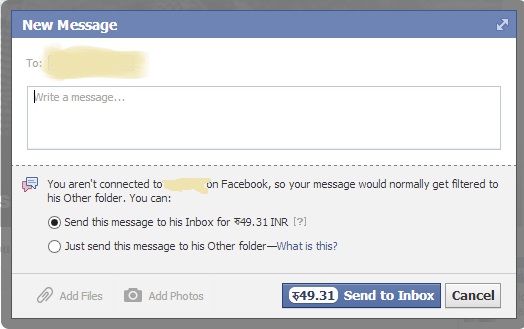
Today I feel shocked while I was surfing on Facebook. Actually I also reduced time for Facebook and visit only 1-2 hour in a week. What give me a shock was actually when I tried to send a Message to someone famous person who has not accepted my Friend Request.


Facebook Charged Money


Facebook asked me for some money. Above is snapshot taken while I see the Screen. I have erased names to prevent privacy of the Friend.

I will be posting if such wild things are seen again. Till then you may add me on Google+ at +John Bhatt or follow at Twitter at @JohnBhatt

Read More

Sunday, 21 April 2013

// // Leave a Comment

Android : Introduction

Hello Friends,

Today, I am going to start New Topic here on my blog. This will be about Android.

We all have android devices and why not to talk about them. Its time to make you informed about the Basic and Important Tips and Things to be done to secure your Mobile and Maximize your Fun.

Definition and Background: 

Android is a Linux Based Mobile Operating System designed for Mainly Touch Screen Devices Initially Designed and Developed by Android Inc. You can find more about this Company, Founders and History on Wikipedia. Some time later, Google bought Andoid Inc and started to Develop it for Mobile Release. For the First Time, Android is released on September 23, 2008. Many of Hardware Manufacturer have implemented the Android System and Customized some UI (User Interface) to make it like their own product because Android is an Open Source Project developed using C, C++ and Java. But the Core system remains same and controlled using Google Services Like Play, Sync and some other Background features and some other Vendor Features so that they attract customers.

Official Website is Android is http://www.android.com and for developers it has its site under subdomain, http://developer.android.com and Source Code can be found at http://source.android.com.

At this time, Most of Android Device (Approx 44 % of All Device) are using Its version 2.3 (and its Minor Versions) and then Approx 29% of Android Devices are using Version 4.0 ( and its Minor Versions).

An Android Device of a Good known company costs Approx 7,000 INR, while there are some Local vendors selling cheaper than these. And Predecting the Highest Rate for an Android is still a difficult task But the cost is compared to their efficiency (Processor Speed, RAM, Internal Memory, Supported Networks, Included Sensors and other Features like Battery Life, Network Capabilities etc).

We will be talking about Features that we must enable and use while using an Android and some more topics in future posts. Till then Keep reading my blog and you can add me on Google+ also. My Profile is +John Bhatt .
Read More
// // Leave a Comment

New Year Gift

Hey Friends,

I still remember those days, honestly and clearly speaking, starting days of my Internet Experience. I have some knowledge of Website Designing. I have learn HTML at Modern Computer Education before heading towards India approximately for 2-3 months. I use to read a book by Hemanta Baral named Manuals for  Masters In Computer Application,
While I have started to learn about the Web Technology, one of Marketing Company Reserved this Domain and offered me for the cost of 1500 USD. I was definitely not in position to grab the offer. So Finally on the First Day of Year 2070, I registered my Nick Name as Website. Now Live at www.pyarb.com.

Happy New Year 2070....

Meanwhile, you can connect me on Google+ and My Profile is +John Bhatt and You can Find Hemanta sir at +Hemanta Baral.
Read More
// // Leave a Comment

Typical Internet : Introduction

Today, I am back with most Popular and known Topic, Internet.
The Internet is a global system of interconnected computer networks that use the standard Internet protocol suite (TCP/IP) to serve billions of users worldwide. In Simple Words, It is Network of Networks connecting All Kinds of Private, Government, Military, Academic, Public and All other.

Typical users use Internet from LAN method. LAN (Local Area Network) is a method of Networking which is basic and most popular, easy and cheapest schema.

If, you know some basic about Internet. You must be familiar with term LAN (Local Area Network). Basic concept of LAN is as below:

You buy a Broadband Connection from your ISP (Internet Service Provider). In case of Nepal Nepal Telecom, UTL and some other private companies, In case of India Airtel, MTNL, VSNL, Sify or other Companies provide Internet service. Then their Support Engineer visit your home and place a small device known as Modem or Router whatever you want to name. The word Modem is combined name of Modulator-Demodulator. This device converts Digital Signals to Electrical and vise-varsa. So that Electric Signals flowing through Land Line cables are converted into Digital Signals so that Computers can understand them and once again The Requests from Computer are converted to Electrical Signals.
A Basic Diagram of How Modem work is:

Then there is one or multiple output port(s) on the back of your Modem and you connect Ethernet Cable with RJ45 Jack to your Ethernet Card (also known as Lan Card) on the CPU Box of your Computer or Laptop.
Image of Ethernet Cable with RJ45 Jack

There are so much advance protocols and systems working behind this simple Logic and Process. Which I don’t want to discuss inside this topic. We will discuss that sometime later.

At the mean time, you can add me on Google+. My Profile is +John Bhatt .
Read More

Saturday, 13 April 2013

// // Leave a Comment

Happy New Year BS 2070


Happy New Year BS 2070 to all of you....
Read More

Monday, 25 March 2013

// // Leave a Comment

Facebook Updated its Layout

Hi,
Everybody. Today I am back with a Good News that you must be aware of. I know you are user of Facebook and at-least use it once in a Day.

Visit below Images to see updated layout.


You can see New Layout of Profile. Big Image Controlled Links for Photo, Friends and Other Links are Application is tabbed with Your name. For more illustration see below Image.


As you see, in about page, You can see Ajax Enabled "Scroll Down to see sections" hint. Facebook will automatically display all records in dynamic way. I love that design.

Enjoy till then. 
Read More

Thursday, 24 January 2013

// // 9 comments

Opening a Bank Account in India for Nepalese Citizen

Hi,

Today, I am going to tell you some different thing. This is not related to Technology but it is related to your Social Life. As a known fact, most of Nepalese People are working in India in various industries including from home workers to Higher Level Management of private companies.


Some of us are here to earn some money, some are studying and some people are used to India and started their own business. We need to send money to Nepal for our relatives (home) or for friends, This is a normal procedure and task.

You just need to have some of the documents. Documents required for opening an account are as below:

  1. Passport or VISA Issued by Nepal Government.
  2. Citizenship card issued by Any District of Nepal
  3. Proof of Address (In India).
  4. Passport Size Photographs.

Details of the documents.

  1. Citizenship Card: Below is attached a sample Citizen ship card. 

  2. 2. Proof of Address: You need to submit a valid address proof while asked by Bank. Such, Address proof includes, Rent Aggrement between your House Owner and you. Telephone or Electricity Bill in your name,  Employment Letter issued by a Valid Company, and other documents as per Satisfaction to Officer who is responsible for opening an Account.
  3. Photographs: 3-4 Passport size Photographs taken in recent time.
  4. VISA or Passport: If you have VISA or PASSPORT issued by Nepal Government, you need not to have Citizenship card.

Steps to open an account.

If you do have Passport or VISA.
Just go to Nearest Branch of Any Bank. Fill the Form and submit your documents as mentioned above. Deposit minimum amount for your account as per instruction of officer. This Amount is INR 500.00 for Rural Areas and INR 1000.00 for Semi Urban, Urban and Metro regions of Government Sector Banks like, State Bank of India, Punjab National Bank, etc. While this amount is INR 2500.00 for Rural Area, INR 5000.00 for Semi Urban and INR 10000.00for Urban and Metros of Private Sector Bank like, ICICI Bank, HDFC Bank, Axix Bank etc.

If you do not have Passport or VISA.
You need to attest your Citizenship card in case you do not have Any International ID Card (VISA or PASSPORT). Citizenship card is taken as National ID Proof.

Steps to Attest your Citizenship Card.

The one and only authority to attest your Citizenship card is the Embassy of Nepal. Embassy of Nepal is located in Central New Delhi and Map is below Embedded. 


If you are going through Metro,Nearest Metro is Mandi House Metro. Office is closed on Saturday and Sunday. Go and write an Application for attesting your Citizenship.

Sample of Application

To,
The Ambassador,
Nepal Embassy, New Delhi,

Subject: Verification of Citizenship Card

Dear Sir,

I am, .........................., resident of  Nepal having permanent address of, ............... village, .............. VDC, ward No. ......... , District ............................, Zone .....................
I am working/studing in India and need to open an Bank Account. You are requested to kindly attest and issue an ID proof. My Original Citizenship card is attached herewith.

Sincerely,
......................
........................... (Local Address)

Write application in above format and submit with your Original Citizenship card, Photocopy of Citizenship card and submit. Once you submitted the document and application, It will be attested and notified to you within 30 minutes (may take longer).
You need to pay INR 125.00 and they will give you a Letter on Letter Head of Embassy of Nepal with their stamp.
A Sample is attached below.

Now, you just need to go to bank, Submit your Letter from Embassy, photocopy of Citizenship, Address Proof and photographs.

Congratulations, if you followed these steps, you will surely get an Account opened with your ID Proofs from your own Nation. Don't support fake agents that promise to make you Voter ID Card, Rasan Card or any other Indian Identity Proof. This is illegal.

You can add me to your Circle +John Bhatt .
Read More

Saturday, 6 October 2012

// // 1 comment

Accordion Panel with CSS

Greetings from John!,
Hope you all are enjoying.
Friends I am back with a new thing for you. Today I am going to show you, how to make a Good Accordion Panel.

Do you know, what is Accordion Panel? You must have seen some tables or Div's in website, that are collapsing and expanding on just Click. You can also call them Collapsible Div or Table.

ASP.NET Ajax Tools make it so Simpler for ASP.NET. You just need to link AjaxControlToolkit.dll to your bin folder and use it in the Page.
Let's add a new Web Form in Solution, this is the Page, where you want to add your collapsible div or table what may contain anything.

Source Code for Design above is here.

<%@ Page Language="C#" AutoEventWireup="true" CodeFile="Default.aspx.cs" Inherits="_Default" %>
<%@ Register Assembly="AjaxControlToolkit" Namespace="AjaxControlToolkit" TagPrefix="asp" %>

<!DOCTYPE html>

<html xmlns="http://www.w3.org/1999/xhtml">
<head runat="server">
<title>Accordian with CSS >> P.Yar.B Complex</title>
<%--<link href="Accordian.css" rel="stylesheet" />--%>
</head>

<body>
<form id="form1" runat="server">
<asp:ScriptManager ID="ScriptManager1" runat="server">
</asp:ScriptManager>
<table width="100%" border="0">
<tr>
<td colspan="2" align="center">
<h1>Accordian with CSS</h1>
</td>
</tr>
<tr>
<td colspan="3" align="center">
<asp:Accordion ID="Accordion1" runat="server" HeaderCssClass="accordionHeader" HeaderSelectedCssClass="accordionHeaderSelected" ContentCssClass="accordionContent" Width="490px">
<Panes>
<asp:AccordionPane ID="pane1" runat="server">
<Header>Hardwares</Header>
<Content>
Mouse<br />
KeyBoard<br />
Monitor
<br />
Printer<br />
CPU<br />
Speakers<br />
Camera
</Content>
</asp:AccordionPane>
<asp:AccordionPane ID="pane2" runat="server">
<Header>Operating System</Header>
<Content>
MS Windows<br />
Linux<br />
Android<br />
Mac<br />
Unix
</Content>
</asp:AccordionPane>
<asp:AccordionPane ID="pane3" runat="server">
<Header>.NET IDE</Header>
<Content>
Visual Studio<br />
Visual Web Developer<br />
SharpDevelop<br />
MonoDevelop
</Content>
</asp:AccordionPane>
<asp:AccordionPane ID="pane4" runat="server">
<Header>John Bhatt</Header>
<Content>
<a href="http://www.johnbhatt.com" target="_blank">Portal Home</a><br />
<a href="http://blog.johnbhatt.com" target="_blank">Blog of P.Yar.B</a><br />
<a href="http://media.johnbhatt.com" target="_blank">Download Center</a><br />
</Content>
</asp:AccordionPane>
</Panes>
</asp:Accordion>
</td>
</tr>
</table>
</form>
</body>
</html>


Now Let's See the CSS, what is on CSS.

.accordionHeader {
border: 1px solid #2F4F4F;
color: white;
background-color: #2E4d7B;
font-family: Arial, Sans-Serif;
font-size: 12px;
font-weight: bold;
padding: 5px;
margin-top: 5px;
cursor: pointer;
}

#master_content .accordionHeader a {
color: #FFFFFF;
background: none;
text-decoration: none;
}

#master_content .accordionHeader a:hover {
background: none;
text-decoration: underline;
}

.accordionHeaderSelected {
border: 1px solid #2F4F4F;
color: white;
background-color: #5078B3;
font-family: Arial, Sans-Serif;
font-size: 12px;
font-weight: bold;
padding: 5px;
margin-top: 5px;
cursor: pointer;
}

#master_content .accordionHeaderSelected a {
color: #FFFFFF;
background: none;
text-decoration: none;
}

#master_content .accordionHeaderSelected a:hover {
background: none;
text-decoration: underline;
}

.accordionContent {
background-color: #D3DEEF;
border: 1px dashed #2F4F4F;
border-top: none;
padding: 5px;
padding-top: 10px;
}

Now Run the Page again. Lets See, how it looked. Check this at your machine. Best of Luck!
Read More

Tuesday, 18 September 2012

// // Leave a Comment

File Upload Control with File Type Filter

Hi,

We are going to learn how to upload a File using FileUpload Control in ASP.NET.

ASPX Code

We Placed a FileUpload Control and a button to Click.

<asp:FileUpload ID="FileUpload1" runat="server" />
<asp:Button ID="BtnUpload" runat="server" Text="Upload File" onclick="BtnUpload_Click" />

Back-end Code

Now BtnUpload_Click event in .cs page.
We are going to Upload only Picture (.JPG file or .BMP file).
 
protected void BtnUpload_Click(object sender, EventArgs e)
{
string sSiteFolder = "ResumeFolder";
string sRealPath = Server.MapPath(sSiteFolder);
if (!Directory.Exists(sRealPath))
Directory.CreateDirectory(sRealPath);
string CompletePath = sRealPath + FileUpload1.FileName;
string FileExt = CompletePath.Substring(CompletePath.IndexOf("."));
switch (FileExt)
{
case ".jpg":
FileUpload1.SaveAs(sRealPath + FileUpload1.FileName);
break;
case ".JPG":
FileUpload1.SaveAs(sRealPath + FileUpload1.FileName);
break;
case ".bmp":
FileUpload1.SaveAs(sRealPath + FileUpload1.FileName);
break;
case ".BMP":
FileUpload1.SaveAs(sRealPath + FileUpload1.FileName);
break;
}
}
Enjoy...
John Bhatt
Read More

Thursday, 6 September 2012

// // 1 comment

Rich Text Editor with ASP.NET


Introduction


As we know, ASP.NET lack a Control, that we need most, RichText Editor. 

If you are trying to create a application or website with Admin Panel or Blog or Forum Website or something such project for Web in ASP.NET platform, we need RickText Editor. 

To overcome from this, we can use Many open source JavaScript based editors, like Tiny MCE, FCKEditor, etc.

Content:

In this Article, we would learn how to Implement Free RichText Editor into ASP.NET website. We are using TinyMCE editor here.

We are using TinyMCE, which is One of most popular and Open Source project. Download latest version of TinyMCE from Download Page, and Extract the Zip File.


Browse the Extracted Location and go to ..\tinymce_3.5.6\tinymce\jscripts folder.

Now Copy the tinymce folder from above Location to your Solution in Visual Studio.


Add a Page where you want to Implement RichTextbox and Design the Page.


Now lets Move to Topic. How to Add TinyMCE in Page and Richtext box Control placed for Content of Blog in above sample.

Insert JavaScript file tiny_mce.js in Web Page and some also initialize this function.

This Code into head Section.

 
<script type="text/javascript" src="tiny_mce/tiny_mce.js"></script>
<script type="text/javascript" language="javascript">
tinyMCE.init({
// General options
mode: "textareas",
theme: "advanced",
plugins: "pagebreak,style,layer,table,save,advhr,advimage,advlink,emotions,iespell,inlinepopups",
});
</script>
Note: You can so many settings, look in Samples and Help Doc of TinyMCE.

Now Run the Page. Look, how it looked.


Without any additional Practice, our TextBox with Multiline turned into RichText Editor.

Now, its ok as per Requirement. No, when you will send Command to Server, it will return Error Like below.


We have to add just One Line of Code in Web.config file and one property in Default.aspx form (Page with Rich Text Editor).

That is : 

in web.config:

<configuration>
<system.web>
<compilation debug="true" targetFramework="4.0"/>
<httpRuntime requestValidationMode="2.0"/>
</system.web>
</configuration>

and in Page directive:

ValidateRequest = "false"

<%@ Page Language="C#" AutoEventWireup="true" CodeFile="Default.aspx.cs" Inherits="_Default" ValidateRequest="false" %>

Now, you can save the Data in Database, Do postback, retrieve same in Rich Text box and do anything you want.

Conclusion


IT is Jugad. So enything is possible here. Don't be worry about things that are not available. Just modify and make use of things those are available. Tiny MCE is one of the most known and Popular Rich Text editor (WYSIWYG).

You can find many more articles written by me on Dotnetspider also. Have a look at them.
You can add me to your Circle on Google+ at +John Bhatt

Hope this will be helpful to you. 
Read More

Wednesday, 29 August 2012

// // Leave a Comment

Implement Same WebMethod for AutoComplete in Multiple Textbox

Hi,


While Answering a question at Forum, I wrote this post.


Suppose We have Multiple Textbox in Same Page and we want to Implement AutoSuggest/AutoComplete feature in All Textbox and of same type. Suppose Multiple Google Search Boxes.


For that case, we have separate Textboxs, Separate AutoComplete Extenders and Separate Methods. We are trying to Consume same PageMethod in All Textbox.


Front End Code:

Product One:


DelimiterCharacters="" Enabled="True" ServiceMethod="GetProducts" MinimumPrefixLength="2"
ServicePath="" TargetControlID="TextBox1" UseContextKey="True">

Product Two:


DelimiterCharacters="" Enabled="True" ServicePath="" TargetControlID="TextBox2"
ServiceMethod="GetProducts" MinimumPrefixLength="2" UseContextKey="True">

Product Three:


DelimiterCharacters="" Enabled="True" ServicePath="" TargetControlID="TextBox3"
ServiceMethod="GetProducts" MinimumPrefixLength="2" UseContextKey="True">


BackEnd Code:


[System.Web.Services.WebMethodAttribute(), System.Web.Script.Services.ScriptMethodAttribute()]
public static string[] GetProducts(string prefixText, int count, string contextKey)
{
SqlConnection con = new SqlConnection(ConfigurationManager.ConnectionStrings["ConToStore"].ConnectionString);
SqlDataAdapter adp = new SqlDataAdapter("Select * from Products where UnitsInStock>0 and ProductName like '%" + prefixText + "%'", con);
DataSet ds = new DataSet();
adp.Fill(ds);
string[] Products = new string[ds.Tables[0].Rows.Count];
for (int j = 0; j <= ds.Tables[0].Rows.Count - 1; j++)
{
Products.SetValue(ds.Tables[0].Rows[j][1].ToString(), j);
}
return Products;
}
Lets Look at the Output.

Hope this will be Helpful.
John Bhatt
Glad to Know, Free to Share.....
http://www.johnbhatt.com

Read More

Friday, 20 July 2012

// // Leave a Comment

Release Date of Windows 8

Hi,


We are waiting for you so long, I think you are also waiting for... 


I am talking about Release Date of Upcoming Version of Windows. Worlds Most popular Operating System is now back with a Bang and Performance, Feature, Speed and Security Rich (Richer than MS), Windows 8.


What We Waited and When we received Publicly:


Developer Preview on : September 13, 2011

Consumer Preview on : On 29 February 2012

Release Preview on : May 31, 2012


And Now the Official announcement of Release Date of Windows 8.


Going to Buy on the First day and you........

Read More

Sunday, 15 July 2012

// // 2 comments

Installing ASP.NET in IIS

Hi,
Today we will learn how to Install .NET in IIS.
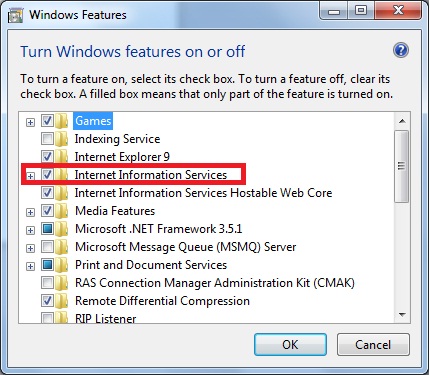
By default IIS is turned Off. To Turn on we will go to Control panel > programs > turn windows feature on or off.

Check all options by Expanding and Make sure that you got the Internet Information Services checked fully as in Above screen. Then you need not to install any more scripts to host asp.net websites.

Now If ASP.NET Websites are not running and throwing error like

The page you are requesting cannot be served because of the extension configuration. If the page is a script, add a handler. If the file should be downloaded, add a MIME map.

Module StaticFileModule
Notification ExecuteRequestHandler
Handler StaticFile
Error Code 0x80070032
Requested URL http://localhost:80/JOHNSAPP/DEFAULT.ASPX
Physical Path C:\inetpub\wwwroot\John\Default.aspx
You should Install ASP.NET (configure IIS for ASP.NET).

Here are some basic steps to do so,
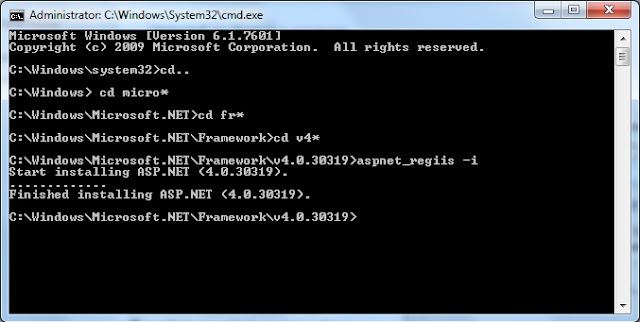
Open Command Prompt as Administrator
Navigate to C:\
C:\>cd Windows

C:\Windows>cd Microsoft.NET

C:\Windows\Microsoft.NET>cd Framework

Now you will be at

C:\Windows\Microsoft.NET\Framework\

First Decide what version are you using. ASP.NET 1.0, 1.1, 2.0, 3, 3.5 , 4 or 4.5 (if Installed).
Then type following code in Command Prompt
C:\Windows\Microsoft.NET\Framework>cd v4.*      //installing ASP.NET V4.0 here.

C:\Windows\Microsoft.NET\Framework\v4.0.30319>aspnet_regiis -i

 Command Prompt will Install Code and You are now Ready to Access your ASP.NET Site with Localhost.

Best of Luck....
John Bhatt
Read More

Wednesday, 11 July 2012

// // Leave a Comment

Thanks and Congratulations....

Just Got the 10,000th Visitor to make my blog hits..

Many many Thanks and Congratulations......
Read More