Loading...
Showing posts with label Computer. Show all posts

Wednesday, 18 September 2013

// // Leave a Comment

Microsoft Excel 2003 : File Menu and Its Commands-2

Hi,

I am back with Remaining part of Excel's File Menu and Commands.
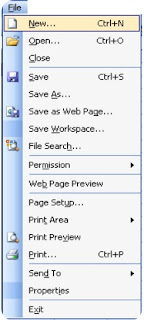


As you remember, in previous post, we have talked about File Menu Commands upto Web Page Preview.
http://www.prithviraj.com.np/2012/06/microsoft-excel-2003-file-menu-and-its.html

Lets start with remaining commands.


11. Page Setup :


When you click this option Page Setup dialogue box appears from which you can adjust document margins, paper size, orientation, header footer, sheet, etc. This is one of the important option for printing document.

    12. Print Area :

This command sets the print area of current worksheet. You can choose which cell range should be printed in paper. You can also clear print area that you previously set. To Set a Print Area, choose range of cells by selecting, then click on File menu, choose Print Area option and finally choose Set Print Area option. To Remove a Print Area click on File menu, go to Print Area and choose Clear Print Area option.

   13. Print Preview :

This option shows how the document will appear after printing in paper. This is very important task before printing any document to save Paper and money. If any improvement needed you have to adjust document margins and other properties from Page Setup option. 

   14. Print (Ctrl+P) : 


This command sends instruction to attached printer that is configured with system. You have options to choose Printer, Page Range, Number of Copies, etc. Shortcut key for this command is CTRL+P.

   15. Send To :

If you want to send your excel workbook to other people via e-Mail you have following options to send the file. This command has following sub-menu:  

  1. Mail Recipient
  2. Mail Recipient (For Review)
  3. Mail Recipient (As Attachment)
  4. Routing Recipient
  5. Exchange Folder
  6. Online Meeting participant
  7. Recipient using Internet Fax-Service

   16. Properties : 

This command shows you Document Properties dialogue box to edit or change properties of document such as Title, Subject, Author, Company, Keywords, and other values which are very important to determine the documents property value which will creates Identity of file.


17. Exit : 

This command terminates MS-Excel. This is alternative of ALT+F4 key. You can also quit application from Title Bar or Task bar also. If the document is not saved yet, MS-Word prompts you to save document and shows Save As dialogue box if chosen Yes from prompt and terminates after saving, if chosen No, terminates immediately and if chosen Cancel MS-Excel remains opened. 


Keep reading, for more Tutorials and Articles subscribe. 

All the Best. 


Read More

Tuesday, 10 September 2013

// // 1 comment

Google and Its Domains

Hi,

This is the list of Google's Domains till date. Other Services and Google Product domain are not included.

Top level domain Extension Country Name
http://www.google.ad .ad  Andorra
http://www.google.ae .ae  United Arab Emirates
http://www.google.am .am  Armenia
http://www.google.as .as  American Samoa
http://www.google.at .at  Austria
http://www.google.az .az  Azerbaijan
http://www.google.ba .ba  Bosnia and Herzegovina
http://www.google.be .be  Belgium
http://www.google.bf .bf  Burkina Faso
http://www.google.bg .bg  Bulgaria
http://www.google.bi .bi  Burundi
http://www.google.bj .bj  Benin
http://www.google.bs .bs  Bahamas
http://www.google.by .by  Belarus
http://www.google.ca .ca  Canada
http://www.google.cat .cat reserved for the Catalan linguistic and cultural 
http://www.google.cd .cd  Congo, The Democratic Republic of the
http://www.google.cf .cf  Central African Republic
http://www.google.cg .cg  Congo
http://www.google.ch .ch  Switzerland
http://www.google.ci .ci  Cote d'Ivoire
http://www.google.cl .cl  Chile
http://www.google.cm .cm  Cameroon
http://www.google.cn cn  China
http://www.google.co.ao .ao  Angola
http://www.google.co.bw .bw  Botswana
http://www.google.co.ck .ck  Cook Islands
http://www.google.co.cr .cr  Costa Rica
http://www.google.co.id .id  Indonesia
http://www.google.co.il .il  Israel
http://www.google.co.in .in  India
http://www.google.co.jp .jp  Japan
http://www.google.co.ke .ke  Kenya
http://www.google.co.kr .kr  Korea, Republic of
http://www.google.co.ls .ls  Lesotho
http://www.google.co.ma .ma  Morocco
http://www.google.co.mz .mz  Mozambique
http://www.google.co.nz .nz  New Zealand
http://www.google.co.th .th  Thailand
http://www.google.co.tz .tz  Tanzania, United Republic of
http://www.google.co.ug .ug  Uganda
http://www.google.co.uk .uk  United Kingdom
http://www.google.co.uz .uz  Uzbekistan
http://www.google.co.ve .ve  Venezuela, Bolivarian Republic of
http://www.google.co.vi .vi  Virgin Islands, U.S.
http://www.google.co.za .za  South Africa
http://www.google.co.zm .zm  Zambia
http://www.google.co.zw .zw  Zimbabwe
http://www.google.com .com United States
http://www.google.com.af .af  Afghanistan
http://www.google.com.ag .ag  Antigua and Barbuda
http://www.google.com.ai .ai  Anguilla
http://www.google.com.ar .ar  Argentina
http://www.google.com.au .au  Australia
http://www.google.com.bd .bd  Bangladesh
http://www.google.com.bh .bh  Bahrain
http://www.google.com.bn .bn  Brunei Darussalam
http://www.google.com.bo .bo  Bolivia
http://www.google.com.br .br  Brazil
http://www.google.com.bz .bz  Belize
http://www.google.com.co .co Colombia
http://www.google.com.cu .cu  Cuba
http://www.google.com.cy .cy  Cyprus
http://www.google.com.do .do  Dominican Republic
http://www.google.com.ec .ec  Ecuador
http://www.google.com.eg .eg  Egypt
http://www.google.com.et .et  Ethiopia
http://www.google.com.fj .fj  Fiji
http://www.google.com.gh .gh  Ghana
http://www.google.com.gi .gi  Gibraltar
http://www.google.com.gt .gt  Guatemala
http://www.google.com.hk .hk  Hong Kong
http://www.google.com.jm .jM Jamaica
http://www.google.com.kh .kh  Cambodia
http://www.google.com.kw .kw  Kuwait
http://www.google.com.lb .lb  Lebanon
http://www.google.com.ly .ly  Libya
http://www.google.com.mt .mt  Malta
http://www.google.com.mx .mx  Mexico
http://www.google.com.my .my  Malaysia
http://www.google.com.na .na  Namibia
http://www.google.com.nf .nf  Norfolk Island
http://www.google.com.ng .ng  Nigeria
http://www.google.com.ni .ni  Nicaragua
http://www.google.com.np .np  Nepal
http://www.google.com.om .om Oman
http://www.google.com.pa .pa  Panama
http://www.google.com.pe .pe  Peru
http://www.google.com.ph .ph  Philippines
http://www.google.com.pk .pk  Pakistan
http://www.google.com.pr .pr  Puerto Rico
http://www.google.com.py .py  Paraguay
http://www.google.com.qa .qa  Qatar
http://www.google.com.sa .sa  Saudi Arabia
http://www.google.com.sb .sb  Solomon Islands
http://www.google.com.sg .sg  Singapore
http://www.google.com.sl .sl  Sierra Leone
http://www.google.com.sv .sv  El Salvador
http://www.google.com.tj .tj  Tajikistan
http://www.google.com.tr .tr  Turkey
http://www.google.com.tw .tw  Taiwan, Province of China
http://www.google.com.ua .ua  Ukraine
http://www.google.com.uy .uy  Uruguay
http://www.google.com.vc .vc  Saint Vincent and the Grenadines
http://www.google.com.vn .vn  Viet Nam
http://www.google.cv .cv  Cape Verde
http://www.google.cz .cz  Czech Republic
http://www.google.de .de  Germany
http://www.google.dj .dj  Djibouti
http://www.google.dk .dk  Denmark
http://www.google.dm .d  Dominica
http://www.google.dz .dz  Algeria
http://www.google.ee .ee  Estonia
http://www.google.es .es  Spain
http://www.google.fi .fi  Finland
http://www.google.fm .f  Micronesia
http://www.google.fr .fr  France
http://www.google.ga .ga  Gabon
http://www.google.ge .ge  Georgia
http://www.google.gg .gg  Guersney
http://www.google.gl .gl  Greenland
http://www.google.gm .gm Gambia
http://www.google.gp .gp  Guadeloupe
http://www.google.gr .gr  Greece
http://www.google.gy .gy  Guyana
http://www.google.hn .hn  Honduras
http://www.google.hr .hr  Croatia
http://www.google.ht .ht  Haiti
http://www.google.hu .hu  Hungary
http://www.google.ie .ie  Ireland
http://www.google.im .im Isle of Man
http://www.google.iq .iq  Iraq
http://www.google.is .is  Iceland
http://www.google.it .it  Italy
http://www.google.je .je  Jersey
http://www.google.jo .jo  Jordan
http://www.google.kg .kg  Kyrgyzstan
http://www.google.ki .ki  Kiribati
http://www.google.kz .kz  Kazakhstan
http://www.google.la .la  Lao People\'s Democratic Republic
http://www.google.li .li  Liechtenstein
http://www.google.lk .lk  Sri Lanka
http://www.google.lt .lt  Lithuania
http://www.google.lu .lu  Luxembourg
http://www.google.lv .lv  Latvia
http://www.google.md .md  Moldova, Republic of
http://www.google.me .me  Montenegro
http://www.google.mg .mg  Madagascar
http://www.google.mk .mk  Macedonia, The Former Yugoslav Republic of\nspons
http://www.google.ml .ml  Mali
http://www.google.mn .mn  Mongolia
http://www.google.ms .ms  Montserrat
http://www.google.mu .mu  Mauritius
http://www.google.mv .mv  Maldives
http://www.google.mw .mw  Malawi
http://www.google.ne .ne  Niger
http://www.google.nl .nl  Netherlands
http://www.google.no .no  Norway
http://www.google.nr .nr  Nauru
http://www.google.nu .nu  Niue
http://www.google.pl .pl  Poland
http://www.google.pn .pn  Pitcairn
http://www.google.ps .ps  Palestinian Territory, Occupied
http://www.google.pt .pt  Portugal
http://www.google.ro .ro  Romania
http://www.google.rs .rs  Serbia
http://www.google.ru .ru  Russia
http://www.google.rw .rw  Rwanda
http://www.google.sc .sc  Seychelles
http://www.google.se .se  Sweden
http://www.google.sh .sh  Saint Helena
http://www.google.si .si  Slovenia
http://www.google.sk .sk  Slovakia
http://www.google.sm .sm San Marino
http://www.google.sn .sn  Senegal
http://www.google.so .so  Somalia
http://www.google.st .st  Sao Tome and Principe
http://www.google.td .td  Chad
http://www.google.tg .tg  Togo
http://www.google.tk .tk  Tokelau
http://www.google.tl .tl  Timor-Leste
http://www.google.tm .tm Turkmenistan
http://www.google.tn .tn  Tunisia
http://www.google.to .to  Tonga
http://www.google.tt .tt  Trinidad and Tobago
http://www.google.vg .vg  Virgin Islands, British
http://www.google.vu .vu  Vanuatu
http://www.google.ws .ws  Samoa

Source: Internet

Enjoy and increase your knowledge.
All the Best.
Read More

Friday, 6 September 2013

// // Leave a Comment

Creating New File and Folder in MS-DOS

Hi,

This is another Tutorials in MS-DOS Series. In this post, we will learn to Create a new file and folder using DOS System. Before this, I would like to introduce you with Command Prompt.
Prompt means “Assist by suggesting the next words of something forgotten or imperfectly learned.” MS DOS prompt also help you and interfaces with you.

In above line C: (colon) is current drive , \ (backslash) is symbol for directory (folder), Users is directory name, \ (backslash) is directory symbol, John is name of folder and > (greater than) is command prompt symbol. This is the place, where you will write command.
1. How to create a File?

Use following commands to create a file in MS-DOS command prompt.

copy con filename ↵

Hi, My name is John. You are learning how to create a file in DOS mode.

^Z ↵
Meaning of above commands.

copy con – This command is used for creating new file.

↵ – This is Enter key. This executes command typed in prompt.

Hi,.. .. .. in DOS mode. – This is text of your file.

^Z ↵ – This is Ctrl+Z key. This saves current file. Alternate for this is F6 key.

2. How to create Folder?

Use following commands to create a folder (directory) in MS-DOS command prompt.

md foldername ↵

or

mkdir foldername ↵
Meanings of Above Command:


md or mkdir – Make Directory

↵ – Enter Key to execute command.
Will be back with more on MS-DOS Series. Till then, you can add me on Google+ at +John Bhatt 
Read More
// // Leave a Comment

Component files of MS-DOS

Hi,

I am back after so long on my Tutorial Series. This is about MS-DOS.

We left at Introduction of Commands, today we will continue with File System of MS-DOS.

DOS is created using following files. IO.SYS, MSDOS.SYS, COMMAND.COM, AUTOEXE.BAT.
These files are created for special purpose like booting, creating and coordinating with devices for input, output  and saving internal commands of DOS in memory.
In other words these are program files which are created which creating DOS. You will get brief introduction to these files on next page.


  1. IO.SYS & MSDOS.SYS: These both files are hidden files. These are system files and are present on every disc. At the time of booting both of these Files are automatically get saved in Temporary Memory. IO.sys stores the standard operation related to input and output devices. And MSDOS.sys file stores command that contact with operating system.

  1. COMMAND.COM : This is a command interpreter file in MS-DOS which is a group of IO.sys, MSDOS.sys and COMMAND.COM. At the time of booting of computer, all these three files are automatically saved in the memory. COMMAND.COM file contains all the definitions of Internal command and programs of these commands. This file is mainly responsible for executing command which are typed by user in command prompt.. 

  1. AUTOEXE.BAT: After booting Operating System it looks for AUTOEXE.BAT file in the disc and executes it. This process is repeated when computer is switched on. It is a batch file which contains MS-DOS command like a program file and it automatically executes the command written in it. Therefore it is named AUTOEXE.BAT which means self executable batch file.

On next post, I will be talking about creating a File in MS-DOS and Making New Directory (folder).

Till then, you can add me to Google+ at +John Bhatt 

Read More

Saturday, 27 July 2013

// // Leave a Comment

Maintenance Complete in Download Center

Hi,

We have finished migrating all thing from Previous Host to New Host. Download Center is expected to Work as same as previous days. Accounts registered with our website has been kept same and you can log in with earlier credential. Other URLs and Bookmarks you added will also remain same and working.


However, Live FM's will be down for some more hours. We are working and collecting more reliable sources of stream. Once it will be done, we will notify you here.

You can keep in touch by Adding us on Facebook page, Just hit Like and Click Show in Feed link which will appear on hovering Like Button. You can also subscribe to new songs on Download Center  via Feedburner Service by Google. Google will drop you a mail once New Song is available on Download Center.

We have shifted to Higher Configuration and Dedicated Server without any Limitations, So Website is expected to load in less time and other resources also.

Till then, enjoy New songs in Download Center and have fun.


Regards,
+John Bhatt & Team
P.Yar.B Complex
Read More

Tuesday, 11 June 2013

// // Leave a Comment

Cloud Storage : Introduction

Hello Everyone!

Today, I am here to discuss about Cloud Storage. This is word nowadays almost all must have heard from their Email Provider or on Advertisements. Even Mobiles tell us to save our Data into cloud. So, finally I am here to clear your confusion and to tell you all I know about Cloud Storage.
Definition from Wikipedia: "Cloud storage is a model of networked enterprise storage where data is stored not only in the user's computer, but in virtualized pools of storage which are generally hosted by third parties, too. Hosting companies operate large data centers, and people who require their data to be hosted buy or lease storage capacity from them. The data center operators, in the background, virtualize the resources according to the requirements of the customer and expose them as storage pools, which the customers can themselves use to store files or data objects. Physically, the resource may span across multiple servers. The safety of the files depends upon the hosting websites."

Requirement :

  • Suppose You have Files stored in your Office PC, you came out of office and need that file urgently, or you have more work and want to work from Home also. 
  • You took a Image from Camera and want that photo on your PC Also. 
  • You frequently have problems with your Device and need them repair and high chances of data Loose. 
  • You are tech guy and try latest softwares and Operating System in your Main Machine (Mobile, PC, Laptop). In that case each time you need to format your machines and you will loose all files including important files.
  • You work on public computer and don't want to save your Files there.

There are so many such situations which cause us to search for a place to save our data that we can access anywhere, anytime. Architects then came with Idea to utilize Web Hosting Service to full fill the requirement. But make them more secure and only accessible using Authenticated Process.

So they created Web Service APIs (Application Programming Interfaces) and make some kind of Web Software (Browser based) and other application for various devices. Most of them are Paid but some services offer some Free space also.

The Computer Software Giant Microsoft has Launched a Service named Windows Live Folders later known as SkyDrive on 1 August 2007. This is currently Offering 25 GB Free Space to earlier users and 7 GB for New users registered after 22 April 2012. More space can be purchased.

Also Internet Giant Google has launched a Service called Google Drive on 24 April 2012. Which is offering 15 GB data for Free. This is enhanced and combined storage for GMail, Photos and Documents and Files.

Also there are many such services like Box, Dropbox and many more. I will be discussing more details about these Services in Future Posts.
Till then read earlier posts, you can add me on Google Plus using +John Bhatt .
Read More

Sunday, 21 April 2013

// // Leave a Comment

Android : Introduction

Hello Friends,

Today, I am going to start New Topic here on my blog. This will be about Android.

We all have android devices and why not to talk about them. Its time to make you informed about the Basic and Important Tips and Things to be done to secure your Mobile and Maximize your Fun.

Definition and Background: 

Android is a Linux Based Mobile Operating System designed for Mainly Touch Screen Devices Initially Designed and Developed by Android Inc. You can find more about this Company, Founders and History on Wikipedia. Some time later, Google bought Andoid Inc and started to Develop it for Mobile Release. For the First Time, Android is released on September 23, 2008. Many of Hardware Manufacturer have implemented the Android System and Customized some UI (User Interface) to make it like their own product because Android is an Open Source Project developed using C, C++ and Java. But the Core system remains same and controlled using Google Services Like Play, Sync and some other Background features and some other Vendor Features so that they attract customers.

Official Website is Android is http://www.android.com and for developers it has its site under subdomain, http://developer.android.com and Source Code can be found at http://source.android.com.

At this time, Most of Android Device (Approx 44 % of All Device) are using Its version 2.3 (and its Minor Versions) and then Approx 29% of Android Devices are using Version 4.0 ( and its Minor Versions).

An Android Device of a Good known company costs Approx 7,000 INR, while there are some Local vendors selling cheaper than these. And Predecting the Highest Rate for an Android is still a difficult task But the cost is compared to their efficiency (Processor Speed, RAM, Internal Memory, Supported Networks, Included Sensors and other Features like Battery Life, Network Capabilities etc).

We will be talking about Features that we must enable and use while using an Android and some more topics in future posts. Till then Keep reading my blog and you can add me on Google+ also. My Profile is +John Bhatt .
Read More
// // Leave a Comment

New Year Gift

Hey Friends,

I still remember those days, honestly and clearly speaking, starting days of my Internet Experience. I have some knowledge of Website Designing. I have learn HTML at Modern Computer Education before heading towards India approximately for 2-3 months. I use to read a book by Hemanta Baral named Manuals for  Masters In Computer Application,
While I have started to learn about the Web Technology, one of Marketing Company Reserved this Domain and offered me for the cost of 1500 USD. I was definitely not in position to grab the offer. So Finally on the First Day of Year 2070, I registered my Nick Name as Website. Now Live at www.pyarb.com.

Happy New Year 2070....

Meanwhile, you can connect me on Google+ and My Profile is +John Bhatt and You can Find Hemanta sir at +Hemanta Baral.
Read More
// // Leave a Comment

Typical Internet : Introduction

Today, I am back with most Popular and known Topic, Internet.
The Internet is a global system of interconnected computer networks that use the standard Internet protocol suite (TCP/IP) to serve billions of users worldwide. In Simple Words, It is Network of Networks connecting All Kinds of Private, Government, Military, Academic, Public and All other.

Typical users use Internet from LAN method. LAN (Local Area Network) is a method of Networking which is basic and most popular, easy and cheapest schema.

If, you know some basic about Internet. You must be familiar with term LAN (Local Area Network). Basic concept of LAN is as below:

You buy a Broadband Connection from your ISP (Internet Service Provider). In case of Nepal Nepal Telecom, UTL and some other private companies, In case of India Airtel, MTNL, VSNL, Sify or other Companies provide Internet service. Then their Support Engineer visit your home and place a small device known as Modem or Router whatever you want to name. The word Modem is combined name of Modulator-Demodulator. This device converts Digital Signals to Electrical and vise-varsa. So that Electric Signals flowing through Land Line cables are converted into Digital Signals so that Computers can understand them and once again The Requests from Computer are converted to Electrical Signals.
A Basic Diagram of How Modem work is:

Then there is one or multiple output port(s) on the back of your Modem and you connect Ethernet Cable with RJ45 Jack to your Ethernet Card (also known as Lan Card) on the CPU Box of your Computer or Laptop.
Image of Ethernet Cable with RJ45 Jack

There are so much advance protocols and systems working behind this simple Logic and Process. Which I don’t want to discuss inside this topic. We will discuss that sometime later.

At the mean time, you can add me on Google+. My Profile is +John Bhatt .
Read More

Wednesday, 2 January 2013

// // Leave a Comment

Run Commands Listed In Alphabetical Order-2

Hi,
Here are the remaining Run Commands for Windows Operating System listed in Alphabetic Order.


Nero ( if installed )
nero
Netmeeting
conf
Network Connections
control netconnections
Network Connections
ncpa.cpl
Network Setup Wizard
netsetup.cpl
Notepad
notepad
Nview Desktop Manager ( if installed )
nvtuicpl.cpl
Object Packager
packager
ODBC Data Source Administrator
odbccp32
ODBC Data Source Administrator
odbccp32.cpl
On Screen Keyboard
osk
Opens AC3 Filter ( if installed )
ac3filter.cpl
Outlook Express
msimn
Paint
pbrush
Password Properties
password.cpl
Performance Monitor
perfmon.msc
Performance Monitor
perfmon
Phone and Modem Options
telephon.cpl
Phone Dialer
dialer
Pinball Game
pinball
Power Configuration
powercfg.cpl
Printers and Faxes
control printers
Printers Folder
printers
Private Characters Editor
eudcedit
Quicktime ( if installed )
quicktime.cpl
Quicktime Player ( if installed )
quicktimeplayer
Real Player ( if installed )
realplay
Regional Settings
intl.cpl
Registry Editor
regedit
Registry Editor
regedit32
Remote Access Phonebook
rasphone
Remote Desktop
mstsc
Removable Storage
ntmsmgr.msc
Removable Storage Operator Requests
ntmsoprq.msc
Resultant Set of Policy ( xp pro )
rsop.msc
Scanners and Cameras
sticpl.cpl
Scheduled Tasks
control schedtasks
Security Center
wscui.cpl
Services
services.msc
Shared Folders
fsmgmt.msc
Sharing Session
rtcshare
Shuts Down Windows
shutdown
Sounds Recorder
sndrec32
Sounds and Audio
mmsys.cpl
Spider Solitare Card Game
spider
SQL Client Configuration
clicongf
System Configuration Editor
sysedit
System Configuration Utility
msconfig
System File Checker Utility ( Scan Immediately )
sfc /scannow
System File Checker Utility ( Scan Once At Next Boot )
sfc /scanonce
System File Checker Utility ( Scan On Every Boot )
sfc /scanboot
System File Checker Utility ( Return to Default Settings)
sfc /revert
System File Checker Utility ( Purge File Cache )
sfc /purgecache
System File Checker Utility ( Set Cache Size to Size x )
sfc /cachesize=x
System Information
msinfo32
System Properties
sysdm.cpl
Task Manager
taskmgr
TCP Tester
tcptest
Telnet Client
telnet
Tweak UI ( if installed )
tweakui
User Account Management
nusrmgr.cpl
Utility Manager
utilman
Volume Serial Number for C:
label
Volume Control
sndvol32
Windows Address Book
wab
Windows Address Book Import Utility
wabmig
Windows Backup Utility ( if installed )
ntbackup
Windows Explorer
explorer
Windows Firewall
firewall.cpl
Windows Installer Details
msiexec
Windows Magnifier
magnify
Windows Management Infrastructure
wmimgmt.msc
Windows Media Player
wmplayer
Windows Messenger
msnsgs
Windows Picture Import Wizard (Need camera connected)
wiaacmgr
Windows System Security Tool
syskey
Windows Script host settings
wscript
Widnows Update Launches
wupdmgr
Windows Version ( shows your windows version )
winver
Windows XP Tour Wizard
tourstart
Wordpad
write
Zoom Utility
igfxzoom


Drop a comment below to reach me or provide feedback on above post.

Happy to Help. 
Glad to Be,
John Bhatt
Read More

Monday, 5 November 2012

// // Leave a Comment

Run Commands Listed In Alphabetical Order

Hi,
Here are the Run Commands for Windows Operating System listed in Alphabetic Order.


Program
Run Command
Accessibility Controls
access.cpl
Accessibility Wizard
accwiz
Add Hardware Wizard
hdwwiz.cpl
Add/Remove Programs
appwiz.cpl
Administrative Tools
control admintools
Adobe Acrobat ( if installed )
acrobat
Adobe Distiller ( if installed )
acrodist
Adobe ImageReady ( if installed )
imageready
Adobe Photoshop ( if installed )
photoshop
Automatic Updates
wuaucpl.cpl
Basic Media Player
mplay32
Bluetooth Transfer Wizard
fsquirt
Calculator
calc
Ccleaner ( if installed )
ccleaner
C: Drive
c:
Certificate Manager
cdrtmgr.msc
Character Map
charmap
Check Disk Utility
chkdsk
Clipboard Viewer
clipbrd
Command Prompt
cmd
Command Prompt
command
Component Services
dcomcnfg
Computer Management
compmgmt.msc
Compare Files
comp
Control Panel
control
Create a shared folder Wizard
shrpubw
Date and Time Properties
timedate.cpl
DDE Shares
ddeshare
Device Manager
devmgmt.msc
Direct X Control Panel ( if installed )
directx.cpl
Direct X Troubleshooter
dxdiag
Disk Cleanup Utility
cleanmgr
Disk Defragment
dfrg.msc
Disk Partition Manager
diskmgmt.msc
Display Properties
control desktop
Display Properties
desk.cpl
Display Properties (w/Appearance Tab Preselected )
control color
Dr. Watson System Troubleshooting Utility
drwtsn32
Driver Verifier Utility
verifier
Ethereal ( if installed )
ethereal
Event Viewer
eventvwr.msc
Files and Settings Transfer Tool
migwiz
File Signature Verification Tool
sigverif
Findfast
findfast.cpl
Firefox
firefox
Folders Properties
control folders
Fonts
fonts
Fonts Folder
fonts
Free Cell Card Game
freecell
Game Controllers
joy.cpl
Group Policy Editor ( xp pro )
gpedit.msc
Hearts Card Game
mshearts
Help and Support
helpctr
Hyperterminal
hypertrm
Hotline Client
hotlineclient
Iexpress Wizard
iexpress
Indexing Service
ciadv.msc
Internet Connection Wizard
icwonn1
Internet Properties
inetcpl.cpl
Internet Setup Wizard
inetwiz
IP Configuration (Display Connection Configuration)
ipconfig /all
IP Configuration (Display DNS Cache Contents)
ipconfig /displaydns
IP Configuration (Delete DNS Cache Contents)
ipconfig /flushdns
IP Configuration (Release All Connections)
ipconfig /release
IP Configuration (Renew All Connections)
ipconfig /renew
IP Configuration (Refreshes DHCP & Re-Registers DNS)
ipconfig /registerdns
IP Configuration (Display DHCP Class ID)
ipconfig /showclassid
IP Configuration (Modifies DHCP Class ID)
ipconfig /setclassid
Java Control Panel ( if installed )
jpicpl32.cpl
Java Control Panel ( if installed )
javaws
Keyboard Properties
control keyboard
Local Security Settings
secpol.msc
Local Users and Groups
lusrmgr.msc
Logs You Out of Windows
logoff
Malicious Software Removal Tool
mrt
Microsoft Access ( if installed )
access.cpl
Microsoft Chat
winchat
Microsoft Excel ( if installed )
excel
Microsoft Diskpart
diskpart
Microsoft Frontpage ( if installed )
frontpg
Microsoft Movie Maker
moviemk
Microsoft Management Console
mmc
Microsoft Narrator
narrator
Microsoft Paint
mspaint
Microsoft Powerpoint
powerpnt
Microsoft Word ( if installed )
winword
Microsoft Syncronization Tool
mobsync
Minesweeper Game
winmine
Mouse Properties
control mouse
Mouse Properties
main.cpl
MS-Dos Editor
edit
MS-Dos FTP
ftp

Remaining commands on next post.
Drop a comment below to reach me or provide feedback on above post.

Happy to Help. 
Glad to Be,
John Bhatt
Read More